Skip to content

Run and improve processes across your systems

Duvo maps how a process runs, proposes improvements, then executes the version you approve. Each cycle verifies the outcome and informs the next.

The Duvo loop

Capture

See how the process actually runs, including the decisions and steps that never reach a system of record.

Process Intelligence

Process Intelligence

CaptureDiagnose

Map how your process works and get an automation proposal.

Explore Process Intelligence

Invoice reconciliation

Current process

An analyst joins four ERP exports in Google Sheets before checking discrepancies.

Automation

DecideAct

Run the approved process across your systems, with your team handling required decisions.

Explore Automation
Freight auditIllustrative execution

XPO Logistics · XPO-441274-26

$2,284.98 potential overcharge

The agreed rule

Missing reweigh evidence requires AP review before SAP posting.

  1. Send the billing dispute

    Allowed after authorisation. Request the corrected invoice with supporting documents.

  2. SAP posting held

    AP review required before this action can proceed.

View source invoice

Operating Insights

VerifyLearn

Track results, review exceptions and see where the process can improve.

Explore Operating Insights

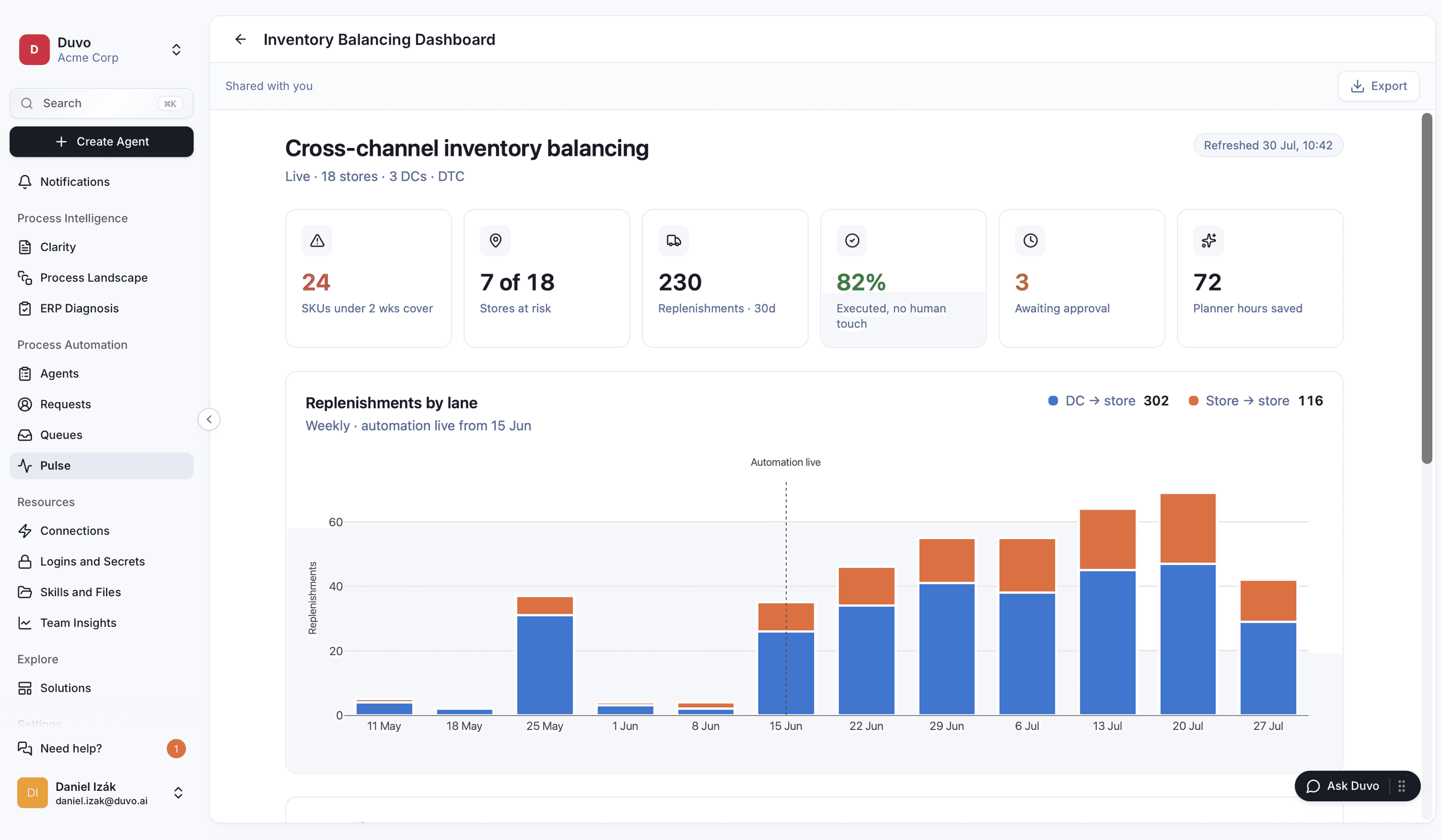
Cross-channel inventory balancing

Inventory example · 18 stores, 3 DCs and DTC

Replenishments · 30d
230
Executed, no human touch
82%
Awaiting approval
3
Planner hours saved
72

Replenishments by lane

DC → storeStore → store

Automation live from 15 Jun

Weekly replenishments from 11 May to 27 July. Blue is distribution centre to store; orange is store to store. Activity increases after automation goes live on 15 June.
11 May15 Jun27 Jul

Keep control across your systems

Duvo connects through APIs where available and browser or desktop interfaces where needed.

Systems

  • Oracle NetSuite
  • SAP
  • Microsoft Excel
  • Microsoft Outlook
  • Microsoft Word
  • Microsoft Teams
  • Slack
  • Microsoft Dynamics
  • Google Drive
  • Salesforce
  • HubSpot
  • Snowflake
  • Microsoft Power BI

Your team approves the rules.

Duvo proposes the steps to automate, the approvals and the exception handling. Your process owner reviews the proposal and approves the rules before production.

Duvo waits where those rules require approval. Missing evidence and unresolved exceptions reach the responsible person. Changes to the rules require process-owner approval.

See the process example

Your process knowledge stays yours.

Keep the discovery outputs your team reviews and owns. Use them for training, improvement or SAP migration with your own team or partner. Automation is a separate choice.

Process maps export as BPMN 2.0 XML. The proposal specifies other deliverables, reuse rights and the exit handoff. Exporting a map does not transfer Duvo’s execution runtime.

Explore discovery outputs

Vendor comparison

  • Duvo vs. Scribe

    Duvo takes the captured process into production.

    Scribe creates guides and analyses recorded workflows. Duvo combines screen walkthroughs with AI interviews that ask follow-up questions about decisions, exceptions and handoffs. Get your first process map and improvement recommendations free, without connecting your systems. Then choose whether Duvo should run the approved process across APIs, browsers and desktops, with your team controlling approvals.

    Map one process for free
  • Duvo vs. Celonis

    Duvo starts discovery before you connect your systems.

    Celonis is built around mining business data to find where processes break down. Duvo starts with the people doing the work: AI interviews, screen walkthroughs and existing documents. You can map a process across SAP, spreadsheets and portals without building a data pipeline. Get the first map and improvement recommendations free, then decide what to change or automate.

    Start free process discovery
  • Duvo vs. SAP Signavio

    Duvo captures the process your SAP programme needs.

    SAP Signavio gives transformation teams a suite for modelling, mining and improving processes. Duvo makes the initial capture easy: your operators show their screens and answer AI follow-up questions, including work outside SAP. Get a reviewed map without connecting to SAP first. Export it as BPMN 2.0 XML for your SI or Signavio team to use in the migration.

    See the SAP migration offer
  • Duvo vs. ServiceNow

    Duvo starts with the process your operations team needs fixed.

    ServiceNow is a natural fit for work already running on its platform. With Duvo, choose a process such as freight audit or invoice reconciliation across the systems you already use. Start from a pre-built module, show us your rules and exceptions, and let Duvo configure the process. Your team approves the actions and reviews the completed work.

    Explore pre-built solutions
  • Duvo vs. Salesforce Agentforce

    Duvo runs the work between your ERP, inbox and portals.

    Agentforce builds on Salesforce data, Flows and integrations such as MuleSoft. Duvo starts with your operational process, whether or not Salesforce is involved. Show how your team handles invoices or orders; Duvo uses existing connections and browser or desktop actions where needed. This reduces the need for new APIs, with system access and approvals agreed upfront.

    See how Duvo connects and executes
  • Duvo vs. UiPath

    Duvo gives you a concrete process to put live in weeks.

    UiPath serves teams building automations and buyers choosing packaged solutions. Duvo gives your operations team a direct route: choose a pre-built module such as Freight Audit, show us the exceptions, and agree the first production outcome. Duvo configures and tests the process with your team. Target go-live in weeks, with the scope and access requirements agreed before starting.

    Explore Freight Audit
  • Duvo vs. Automation Anywhere

    Duvo makes the first step a free process map.

    Automation Anywhere offers process discovery, AI-assisted building and packaged automation. With Duvo, your team shows and explains one process, including the judgment behind exceptions. Get the map and improvement recommendations free, with no obligation to automate. If you continue, choose a supported module and pay for production by completed process runs, with the unit and volume agreed upfront.

    Map one process for free
  • Duvo vs. Camunda ProcessOS

    Duvo gives you a pre-built operational starting point.

    Camunda ProcessOS brings AI discovery and deployment to Camunda orchestration and is currently in closed beta. Duvo lets you start with a named module such as Freight Audit or Payables Audit, then adapt it to your systems and approval rules. For a process that needs discovery first, get the map free and keep it without buying automation.

    Find your starting solution